If you read nothing else
Following an information architecture redesign grounded in usability research, search success on VITA’s website increased from 52% to 95%, and average task time decreased from 3:05 to 15 seconds. This case study details the full process, including task-based usability testing with state employees, card sorting, content auditing, and implementing a new three-tier navigation architecture for 55,000 users across more than 60 agencies. It also shows how research is conducted in a regulated government environment, where findings must meet legal, policy, and technical requirements before implementation.
Context
The Virginia Information Technologies Agency (VITA) serves more than 60 executive branch state agencies and 55,000 Commonwealth employees. In 2020, during my first week at VITA, I inherited a redesign project that required launch within seven days, with no handoff, research artifacts, or time for testing. Although the site launched with improved aesthetics, the underlying structure remained unchanged.
Five years later, I worked with a UX Content Strategist and three developers to address the core issue: the information architecture.

Problem
The site was structured according to VITA’s internal operations rather than user needs.
A 2020 post-launch exit survey made the structural problems hard to ignore. Only 52% of users could easily find what they needed. The megamenu was called out repeatedly as confusing and cumbersome. Users who couldn’t find what they needed through navigation fell back on site search — which returned irrelevant results — and eventually resorted to Googling VITA’s own content.
“I do external searches to find stuff on your site, since internal search finds nothing relevant.”
— 2020 exit survey respondent
The navigation mirrored VITA’s internal divisions rather than user goals. Labels such as “ORCA,” “EA Library,” and “Sourcing & Commodity Management” were meaningful to VITA staff but largely unfamiliar to agency employees using the site during the workday. High-frequency tasks were buried several levels deep. Over time, hundreds of pages accumulated without content governance, rendering search results largely ineffective.

Approach
The team tested real tasks, measured user friction, and rebuilt the site architecture based on actual user needs.
Before starting the redesign, the team ran moderated usability tests on a beta prototype using real tasks, such as finding procurement guidance, locating the wireless zip code coverage tool, and navigating cybersecurity resources. The objective was to identify specific points where users encountered difficulties, rather than simply measuring eventual task completion.
The wireless zip code search served as a valuable diagnostic tool. State employees frequently use this feature to verify coverage for agency devices, yet it was located under “Procurement.” Most users initially searched under “Telco Services” or “Wireless Services.” Several participants navigated through two or three incorrect sections before locating the tool. The average time to complete this task was 3:05, which is excessive for a routine activity.

Testing also revealed a consistent expectation that the homepage should explain VITA’s purpose before prompting users to navigate, especially for those arriving from external links without prior context. This insight informed a homepage redesign that highlights the agency’s mission and prominently presents high-frequency tasks.
The team implemented structural improvements alongside content governance efforts. In collaboration with the UX Content Strategist and content owners across the agency, the team audited the entire site. It removed 600 pages of outdated, duplicate, or orphaned content before launch. This process was essential, as excessive content directly contributed to poor search results; its removal was as critical as restructuring navigation.
Solution
The solution incorporated a three-tier architecture, plain-language labels, and dual navigation, all supported by a thoroughly curated content foundation.
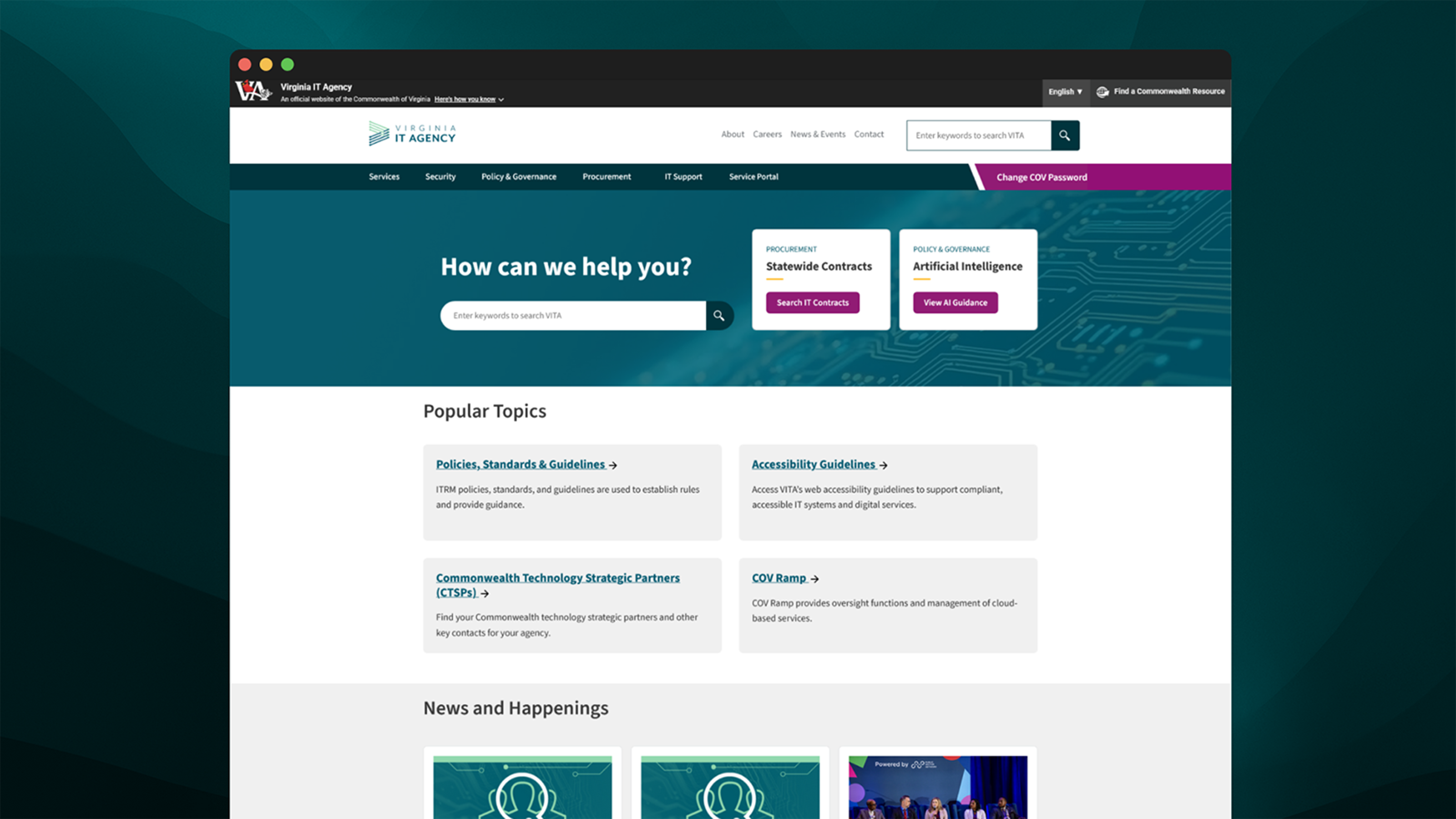
The redesigned site replaced the flat megamenu with a three-tier structure: a streamlined top navigation with six plain-language section labels, category landing pages that orient users before listing content, and persistent left navigation within each section. Users no longer needed to remember where specific content lived; they could browse from any section or search directly from the homepage or navigation bar.
The homepage was redesigned to highlight VITA’s mission and the audiences it serves, with high-frequency tasks prominently displayed. CMS content types were rebuilt to align with design specifications, closing the gap between design intent and development output that had previously caused template inconsistency.


Impact
Wayfinding success increased from 52% to 95%, and the time required to complete a common task decreased from three minutes to fifteen seconds.
Post-launch usability testing measured the same tasks evaluated before the redesign. Wayfinding success, defined as the proportion of users who could locate desired content without a workaround, increased from 52% to 95%. The wireless zip code task, which previously averaged 3:05, was reduced to 45 seconds using the top navigation and 15 seconds using the search bar.
First impressions were uniformly positive. The homepage was described as “clear and functional, concise, and meeting expectations.” Navigation was specifically noted as “very, very clear.” Key content, including cybersecurity resources, the E-Rate program, and the service catalog, was accessible without significant friction.
A clear indicator of success was that no users reported needing to use Google to locate content on VITA’s website.
Removing 600 pages before launch directly improved search result quality by eliminating irrelevant content that had previously made internal search ineffective. Content governance was a collaborative effort with content owners across the agency, and maintaining this governance beyond the redesign remains an ongoing commitment rather than a one-time solution.